You have installed the au2mator Self-Service Portal with the EntraID connection, so the LDAP Question Type is not enabled directly.
For this, we need to add your DSR to the appsettings.json.
How to find the correct Domain Search Root: How to get the correct Domain Search Root
- Naviagte to you au2mator Dir, mostly "C:\inetpub\au2mator"
- Open the file "appsettings.json"
- Enter your Domain Search Root as displayed here
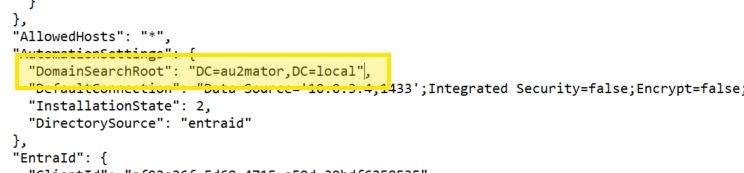
Save the File and reload the Portal. The LDAP Question Types should now be available to configure.
Was this article helpful?
That’s Great!
Thank you for your feedback
Sorry! We couldn't be helpful
Thank you for your feedback
Feedback sent
We appreciate your effort and will try to fix the article